What is Claude Code?

Jakarta, Pintu News – Claude Code is the latest innovation in the development of artificial intelligence designed to revolutionize the way developers interact with code.
Different from conventional programming assistants, Claude Code comes as an agentic coding assistant that not only provides advice, but is also able to read the codebase thoroughly, write and edit code, and execute commands directly in the development environment.
What is Claude Code?
Claude Code is an agentic programming tool capable of reading the entire codebase, editing files, executing commands, and integrating with various development tools. It can be accessed through a terminal, IDE, desktop application, or browser.
Read also: What is Devin AI? The First AI Software Engineer
Claude Code is an AI-based programming assistant designed to help developers build features, fix bugs, and automate various development tasks. With its ability to understand the entire codebase, Claude Code can work across files and tools to get the job done efficiently.
How much does it cost to use Claude Code?
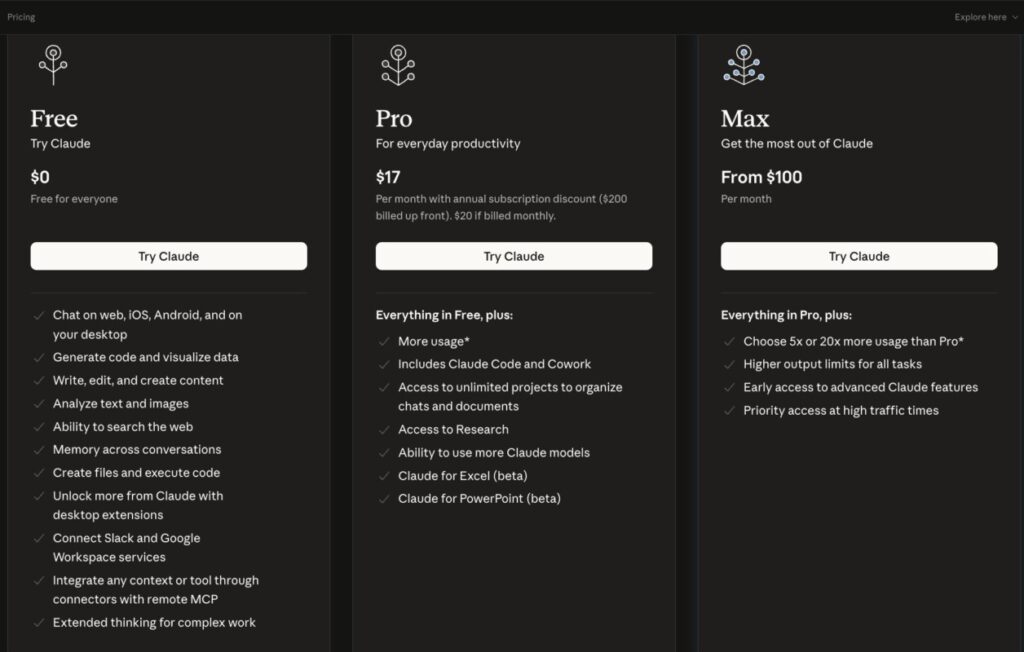
Claude Code offers three subscription plans designed to meet the needs of users with different usage levels, ranging from basic use to high-intensity professional needs.
Free Package
The Free plan is available at no cost or Rp0 and can be used by anyone. This package allows users to access Claude through various platforms such as web, iOS, Android, and desktop. Features include code generation, data visualization, content writing and editing, text and image analysis, and web search.
Pro Package
The Pro package is aimed at everyday productivity needs and costs around Rp287,538 per month. This package includes all the features of the Free version, with additional enhancements.
Users get greater usage capacity, access to Claude Code and collaboration features (Cowork), as well as the ability to manage projects without limits in organizing chats and documents. In addition, there is access to research features, the use of more Claude models, and additional integrations such as Claude for Excel and PowerPoint (in beta).
Max Package
The Max plan is designed for users who require maximum performance and capacity, with prices starting at around $100 or Rp1,691,400 per month. This plan includes all the features of Pro, with significant improvements such as 5 to 20 times more usage capacity than Pro.
In addition, users also get higher output limits for all task types, early access to Claude’s advanced features, and priority access during traffic spikes.
Overall, these three plans demonstrate a tiered approach, where users can start from basic needs at no cost, and then upgrade to more advanced features and greater capacity according to the complexity of their usage.
Claude Code Function
Claude Code is an agent-based assistant that runs directly on the terminal. While it excels at programming, it can also help with a variety of tasks that are typically done through the command line, such as writing documentation, running builds, searching for files, doing topic research, and more.
When someone assigns a task to Claude, he will work through three main stages: gathering context, taking action, and verifying results. These three stages overlap and run dynamically.
Claude uses a variety of tools throughout the process, whether it’s searching for files to understand the codebase, editing code to make changes, or running tests to ensure the results are correct.
Owner CEO Claude Code

Claude Code is owned and developed by Anthropic, an American artificial intelligence company. Anthropic is an AI company founded in 2021 by former OpenAI researchers, including Dario Amodei and Daniela Amodei.
The owner of Claude Code is Anthropic, not an individual. However, Boris Cherny is the creator and development lead of Claude Code at Anthropic.
Read also: 5 Ways to Use Braintext AI for Trading
Why is Claude Code popular?
According to Ethan Mollick, one of the main reasons Claude Code is so superior and popular is its ability to utilize various mechanisms in the agentic harness to overcome the limitations of AI models like LLM, despite being supported by advanced models like Opus 4.5.
When the conversation context starts to fill up, Claude Code pauses the process and performs “compression” by summarizing the progress and recording its last position. After that, the context is reset, and the system resumes work by reading the record again.
In addition, Claude Code uses the Skills feature, which is a collection of instructions and tools that are automatically selected according to the needs of the task. For example, to create a website, the system will load the Website Creator Skill; while to create a spreadsheet, the Excel Skill will be used, complete with relevant guidance and tools.
Claude Code is also capable of creating sub-agents, which are additional AI agents that are more specialized to accomplish certain parts of the task. This approach helps in tackling complex problems more efficiently.
Another advantage is its ability to work directly on the user’s computer. Claude Code can read and create files (such as Word or PowerPoint), access the web through a browser, and write and run programs. As such, its capabilities are close to what a human can do with full access to a computer.
How to use Claude Code
Step 1: Setting up Claude Code
To start using Claude Code, you need a terminal, a code project to work on, and a Claude account-either through a paid subscription (Pro, Max, Teams, or Enterprise) or a Claude Console account with active billing.
- The installation process is quite simple, by running the installation command in the terminal according to the operating system and terminal type used.
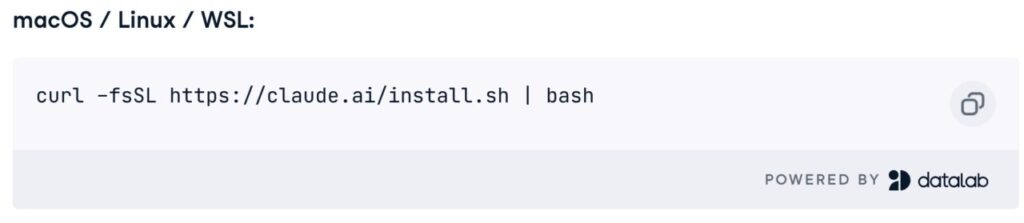
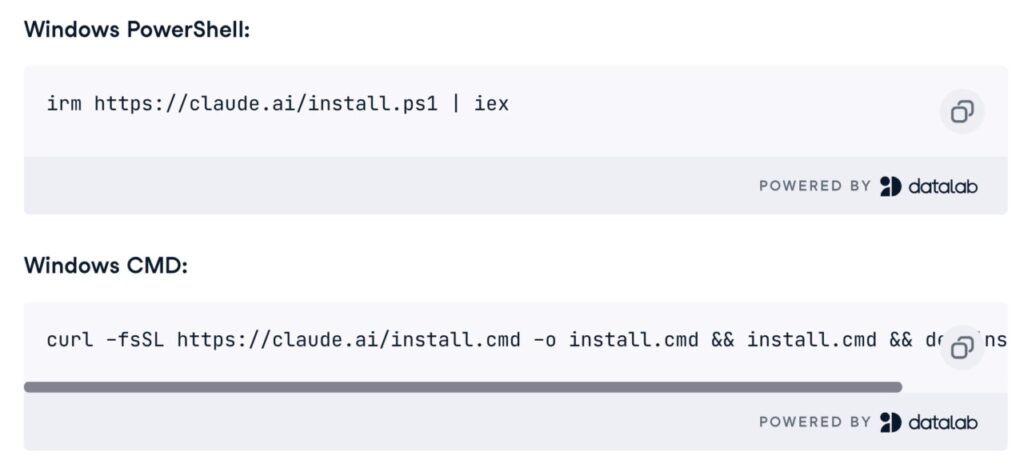
- Once the installation is complete, navigate to your project directory, then run Claude Code through the terminal to get started.

- At the authentication stage, you will be asked to choose the usage method, whether it is through a paid subscription or based on API usage (billing).
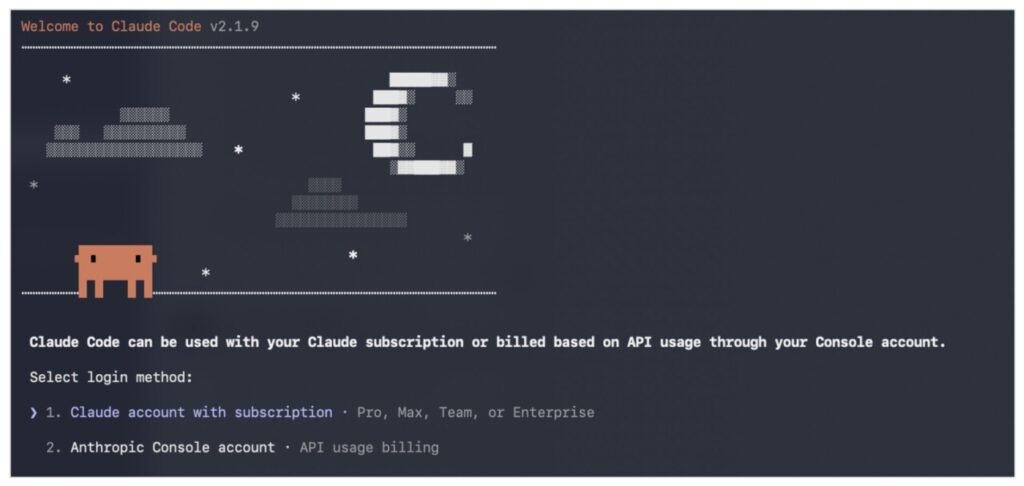
- Next, you will receive a login link containing a verification code. Enter the code into the terminal where Claude Code is running. Once this process is complete, the system will automatically create a dedicated “Claude Code” workspace that is used for usage tracking and cost management.
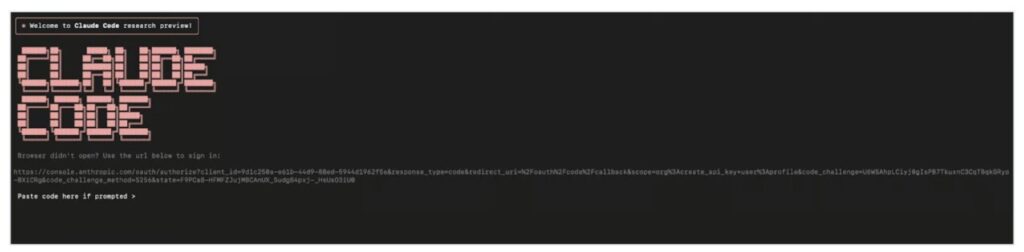
- Once all these steps are completed, Claude Code is ready to use.
Step 2: Setting up the Development Environment
In this demonstration, a Python Supabase library called supabase-py is used, which is an open-source client for interacting with Supabase-a PostgreSQL-based backend-as-a-service that provides features such as authentication, real-time subscription, storage, and an automatically generated API.
- The first step is cloning the repository as well as setting up the development environment.
Open a terminal, then navigate to the directory where you want to store the repository (for example with the cd Desktop command). After that, run the Supabase-py repository cloning command.

- Next, create a virtual environment and install all the necessary dependencies by running several commands in the terminal in sequence.
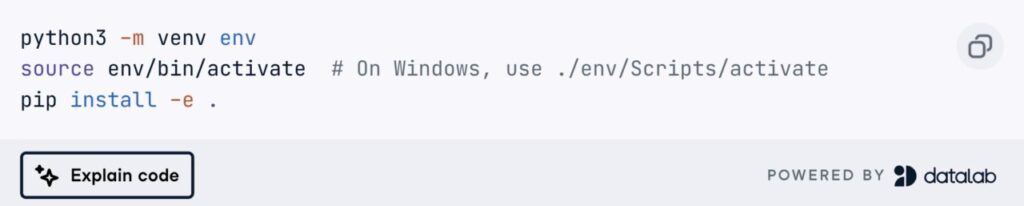
- Once that process is complete, your Python environment is ready to go with all the dependencies needed to run the Supabase library, and the repository is ready for further exploration.
Step 3: Determine Areas of Contribution
One of the best ways to start contributing is to review the Issues tab on GitHub. In the Supabase repository, an issue was found in the client.py file related to code readability, unorganized structure, and lack of informative comments.
Through Claude Code, there are three main things that will be done. First, refactor the code to make it more readable, maintainable, and extensible. Second, adding docstring and relevant inline comments to clarify the function of each component. Third, identify and fix bugs by analyzing existing issues and other possible errors in the code.
So, can Claude Code be used for tarding? The answer is yes.
What Can Claude Code Do for Trading?
Claude Code can function as a developer agent, so its role is more about building and automating trading systems, rather than executing trades natively. Some relevant use cases:
Creating trading bots: Writing and running Python scripts for trading strategies (e.g. using APIs of exchanges like Binance).
Strategy backtesting: Testing the performance of a trading strategy using historical data.
Analyze market data: Automatically process price data, technical indicators or trading signals.
Exchange API integration: Connect to platforms such as Binance or Coinbase for order execution.
Workflow automation
For example: capture market data → analyze → generate signal → send notification / execute order
Follow us on Google News to stay up to date with the latest in crypto and blockchain technology. Check Bitcoin price, usdt to idr and tokenized nvidia stock price via Pintu Market.
As a safe crypto app, Pintu provides a crypto trading experience to access crypto gold investment easily and conveniently. You can also see today’ s gold jewelry price and today’s gold bullion price to support your investment activities and portfolio diversification as well as learn crypto through Pintu Academy.
Download the Pintu crypto app via Play Store or App Store now. Enjoy web trading experience with advanced trading tools such as pro charting, various types of order types, and portfolio tracker only at Pintu Pro.
*Disclaimer
This content aims to enrich readers’ information. Pintu collects this information from various relevant sources and is not influenced by outside parties. Note that an asset’s past performance does not determine its projected future performance. Crypto trading activities are subject to high risk and volatility, always do your own research and use cold hard cash before investing. All activities of buying and selling Bitcoin and other crypto asset investments are the responsibility of the reader.
Reference:
- Claude Code Docs. Claude Code overview. Accessed on March 27, 2026
- Ethan Mollick. Claude Code and What Comes Next. Accessed on March 27, 2026
- Product Talk. Claude Code: What It Is, How It’s Different, and Why Non-Technical People Should Use It. Accessed on March 27, 2026
- VirtusLab. Understanding How Claude Code Works: A Deep Dive into LLM-Powered Developer Tools. Accessed on March 27, 2026


