Getting Started with Futures Trading on Pintu

Crypto futures trading is one of the most popular ways of trading crypto. Users choose to trade crypto in a futures platform in order to maximize their potential profits. In a bullish market environment, a 70% parabolic move can turn into 700% profits through the use of leverage. So, this is why many traders turn to futures trading. This article will give you a step-by-step guide on how to start crypto futures trading in Pintu Pro.
Key Takeaways
- Leverage magnifies gains and losses: A 70% move on the spot market can turn into a 700 % return when trading with leverage. This is why many traders prefer futures over spot trading.
- Profit from both price directions: A long position earns when prices rise, while a short position gains when prices fall. Futures are useful for both hedging and short‑term speculation.
- Strict margin and risk management is essential: Always monitor Margin Usage (MU) and maintenance margin, and use stop‑loss orders and the mark price. A full‑margin 25× position on Pintu Futures will be liquidated with just a 3 % adverse move.
- Getting started on Pintu Pro is simple: Deposit IDRT or transfer USDT to Pro Spot, move the funds to Pintu Futures, choose an asset, set your leverage, then place a limit order with TP/SL.
What is Futures Trading in Crypto?
Futures trading is a type of trading where traders buy and sell contracts that track the price of an asset without having to own the asset. When you trade a futures contract, you agree to buy or sell cryptocurrencies at a future date (in the case of perpetual futures, without an expiry).
In a futures market, there are two types of trades: long and short. Long traders buy a contract that says the asset will go higher in the future. On the opposite, short traders sell the contract and believe the asset will trade lower in the future. Traders profit if the price moves according to their prediction or get liquidated if they are wrong.
A trader will get liquidated when the price moves too far in the opposite direction. The trader will lose all of their deposited funds for the position (also called margin) if liquidation occurs.
In crypto futures trading, perpetual futures are the most common form of derivative contract. Perpetual futures or “perps” contribute more than half of crypto’s total trading volume.
Read more about perpetual futures trading in Pintu Academy: What is Perpetual Futures Trading?
Why Trade Futures?
- Profit from both price directions: Perpetual futures let you go long or short to profit from both rallies and pullbacks. If you are confident and can manage your risks, you can even open a short trade on one asset and a long trade on the other.
- Amplifying your returns: Leverage, such as 25x or 50x, allows you to open larger positions using a small initial margin, allowing significant gains on small price moves.
- Perfect for short-term traders: Futures trading is perfect for low-timeframe traders looking to capitalize on price movements in the short term. Scalpers and low-timeframe swing traders can utilize futures trading to make small but consistent profits.
Spot Trading vs Crypto Futures Trading
| Spot Trading | Futures Trading | |
|---|---|---|
| Risks | Lower, no liquidation risk | Higher if using leverage |
| Ownership | You have ownership over your cryptocurrencies | User gains exposure to the underlying asset, but not physical ownership |
| Initial Capital | 100% of the value of the asset you want to purchase | The initial margin of the asset value at purchase is usually just a fraction of the total value |
| Potential Profit | You will gain when the underlying asset increases in value, in a 1:1 ratio | Depending on the leverage and side (long vs. short), you can profit when prices go up or down, and in multiples of the underlying asset’s value increase (or decrease) |
| Purpose | Long-term investment and trading | Short-term trading or as a hedging strategy |
How to Start Trading Crypto Futures on the Pintu App
Step 1: Depositing USDT to Your Pintu Futures Account
Getting USDT
To trade perpetual futures, you need to fund your futures account with USDT margin.
If you do not have any USDT balance, then you will need to buy USDT on Pintu or Pintu Pro or you can deposit USDT from external wallets by using the “Receive” function.
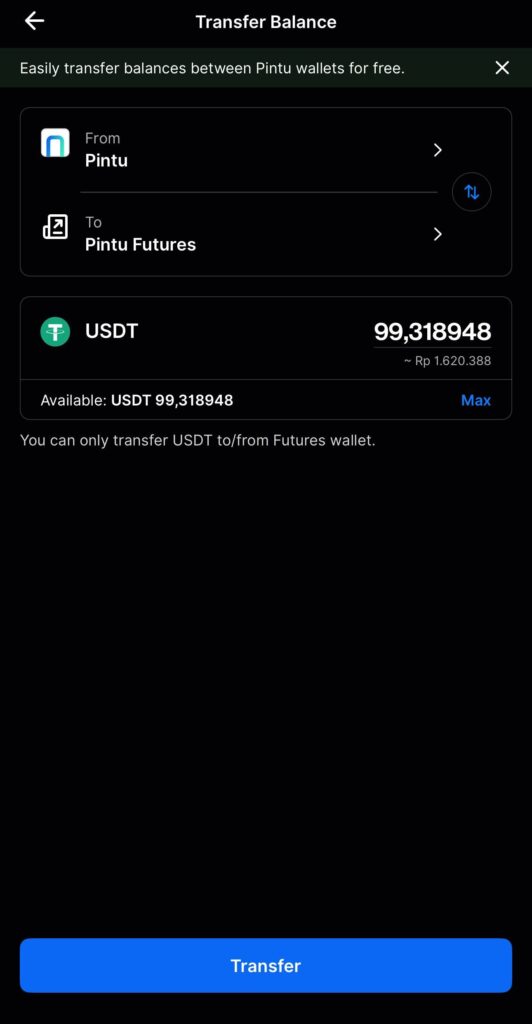
Transferring USDT to Futures
Once you’ve got your USDT balance, you can transfer the USDT balance from Pintu or Pintu Pro to Pintu Futures margin account directly.
Pintu will soon support direct convert and transfer of IDR balance into your futures account as USDT to streamline & simplify the futures deposit process. Stay tuned.
Step 2: Opening a Position
Selecting a Contract to Trade
To start trading, first pick a contract you want to trade – for example, SOLUSDT-PERP. Then click on any SOLUSDT-PERP you see on the Homepage or on Markets, or go directly to the Futures tab and find SOLUSDT-PERP from the top left trade drawer, which will lead you to the Pintu futures trading page.
Submitting Your Order
Once on the futures trading page, make sure the contract is the one you want to trade and then fill out the order form.
Make sure you fill out the key fields correctly to avoid errors and order rejection. Below are some key fields and definitions.
| Field | Description |
|---|---|
| Order Type | Select the order type you want to use – Limit vs Market to open a new order |
| Price | The price you want to enter at, applicable if you are sending a Limit Order |
| Size | The quantity you want to trade, this can be in USDT or the base asset |
| Margin Cost | The amount of USDT margin you need to submit this order |
| TP/SL | Take Profit / Stop Loss is a more advanced form of order that automatically closes your position when in profit or loss |
| Post-Only | Makes sure your order will not immediately execute and will be placed into the order book |
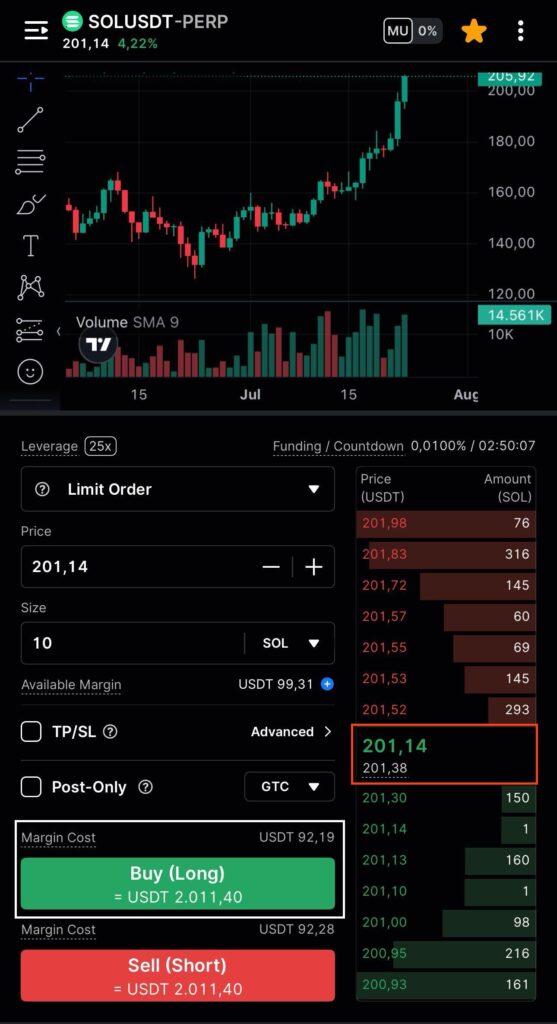
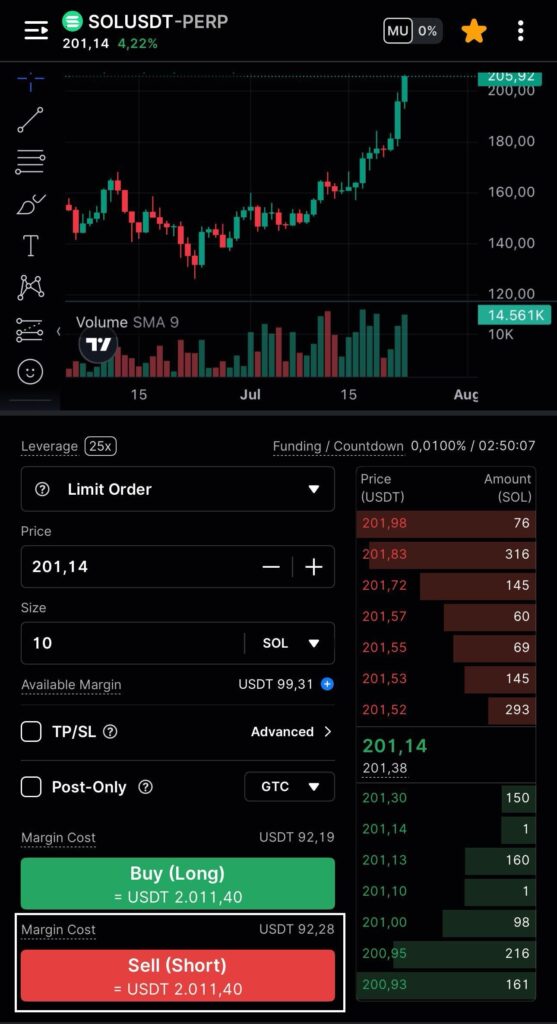
What is Margin? Margin is the required collateral a trader must provide to open and keep a leveraged futures position. Users need to have a margin value equal to 2–10 percent of a position’s value. In Pintu futures, you need an initial margin requirement of 4%. So, users need to provide 4% of their position value as the initial margin.

For example, a user opening $5k 25x leverage long position on ETH needs $200 (4%) as initial margin. If the user has $500, their maintenance margin is $50 and available margin is $450. So, this user’s position will get liquidated once the loss reaches $450 or 9%.
Once you’ve completed the Order Form and made sure you have sufficient USDT margin balance to cover the Margin Cost, you can click Buy (if you want to open a Long position) or Sell (if you want to open a Short position).
If you’ve submitted a Market Order, then congratulations, you’ve opened a futures position. If you submitted a Limit Order, as soon as your order is filled, your futures position will be opened.
Pro Tip: perpetual futures always trade on leverage, a useful proxy to see how much you can trade is simply to multiply your capital by the number of leverage offered on the contract.

So, for example, if you have USDT 100, and you want to trade a 25x contract, you can trade “up to” USDT 2500; but we generally encourage users to trade below this since your account will be at a high risk of liquidation if you trade 25x. Trading at less than 10x (i.e. USDT 1000) will be much safer.

Read more about Leverage in Pintu Academy: Managing Risk in Futures Trading With 25x Leverage.
Step 3: Managing Your Position & Risks
Trading futures can bring huge potential for returns, but it also comes with a lot of risk. You must always monitor your positions and risks closely to avoid liquidations and excessive losses.
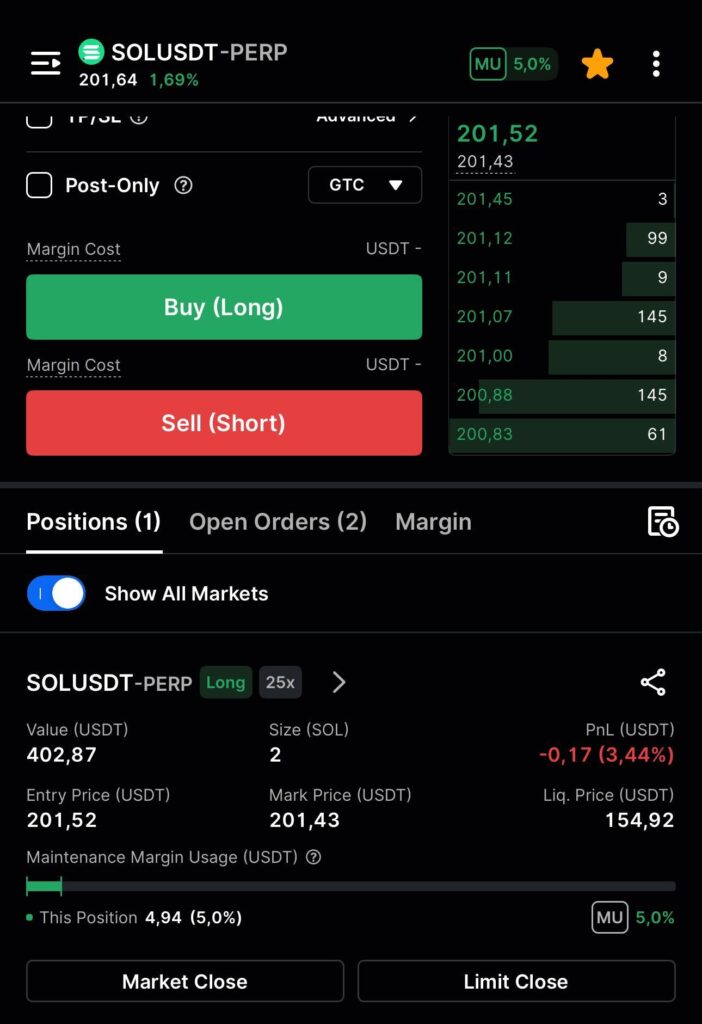
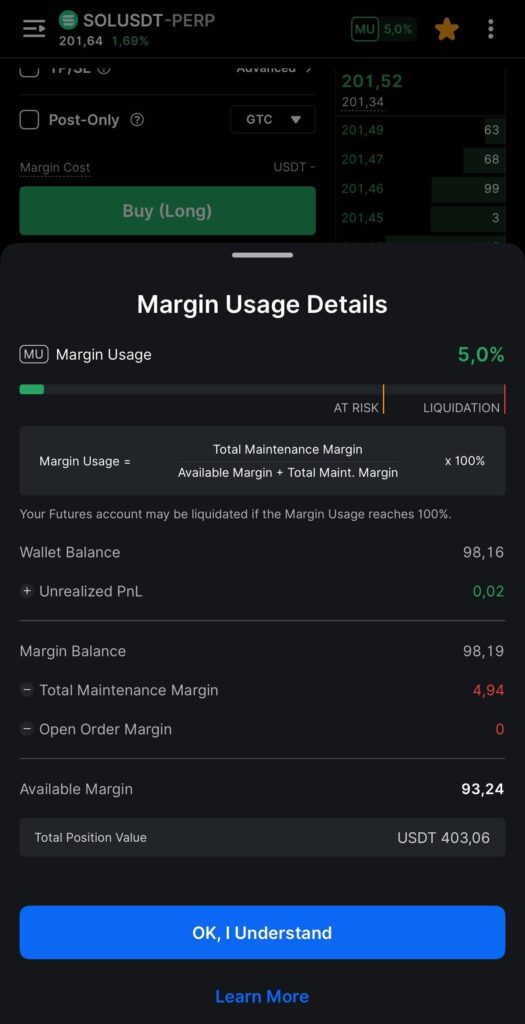
The 3 key things to monitor are your Margin Usage Ratio (”MU”), your maintenance margin and your positions’ Liquidation Price & Unrealized PnL.
Margin Usage Ratio
MU% is a quick and easy way to understand your account’s liquidation risk. If MU reaches 100%, then CFX will cancel any open orders you have, and if you have no open orders, liquidate your account. MU% is viewable from the Futures Trade Page, Futures Wallet Page and the Home Page.
Maintenance Margin
Maintenance margin is the minimum amount of capital you need to maintain your position. If your margin balance falls to this level (due to P&L losses or other factors), then you will trigger a liquidation.
Liquidation Price & Unrealized P&L
Pay attention to the liquidation price of your position. If the Mark Price touches this price, then your account may be liquidated. Liquidation price will always be below the mark price for long positions and above the mark price for short positions.
You may also want to monitor your unrealized P&L so that you take appropriate measures to stop losses or take profits.
Pro Tip 1: Mark price is different than spot price and entry price. The mark price is calculated as a weighted average from the largest international crypto exchanges. This ensures that the Mark Price is the most reliable price source that is less prone to manipulation.

Pro Tip 2: While your unrealized P&L is calculated using the mark price against your entry price, the final and actual realized P&L you will receive will be based on the final traded price when you close the position. If Mark Price and the Order Book price have a large deviation, then pay extra attention as it may indicate high volatility and you may not be able to fully realize your P&L potential.
Step 4: Closing Your Position
If you want to close your position, there are a few ways to do it. Within the positions tab, you can use the Market Close and Limit Close functions to help you close out your position. Both options will also provide you with a view of the estimated P&L if you were to close the position.
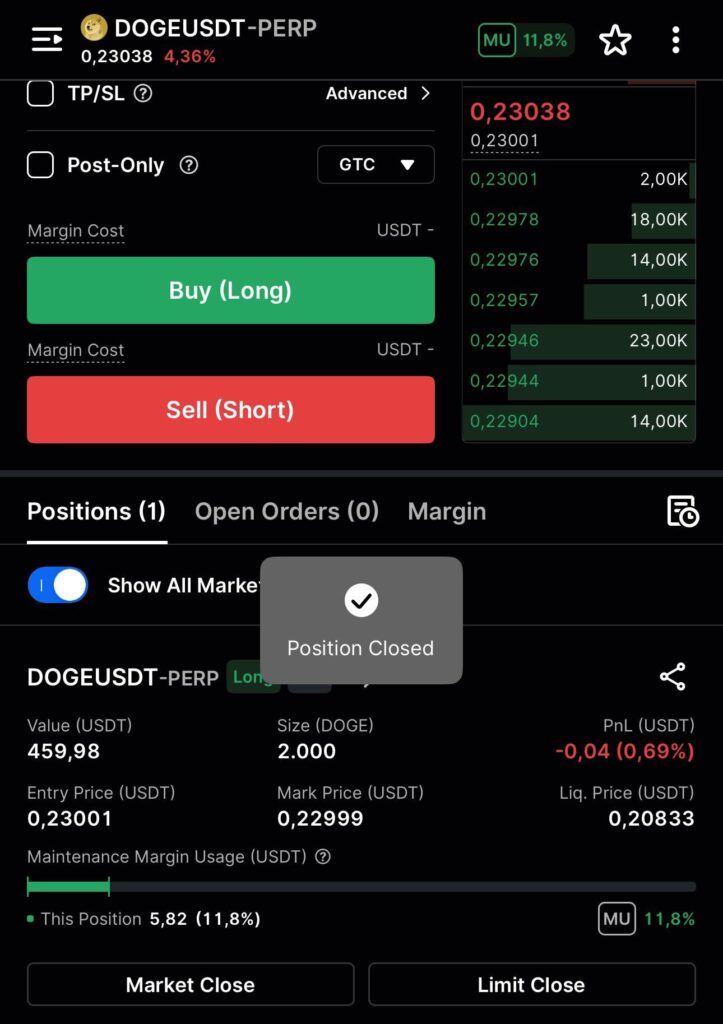
- Market Close allows you to instantly close your position at the best available market price. This is useful if you want to exit quickly, especially in fast-moving markets.
- Limit Close lets you set a specific price at which you’d like to close your position. Your order will only be filled if the market reaches that price, giving you more control over the execution.
Alternatively, you can also simply submit a new order in the opposite direction. For example, if you are long 1 BTC, then you can close your position by submitting a 1 BTC short order.
Pro Tip 1: You only need the margin cost to open a new position. When you are submitting an order to close an open position, the margin cost of that order will be zero.
Step 5: Check Your Realized P&L
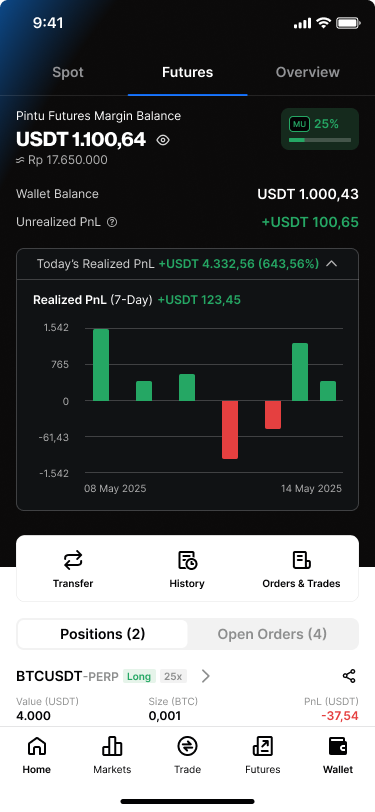
Pintu provides users an easy way to see their trading realized P&L over a 7-day rolling period. You can access this by going to the Futures wallet and opening the realized P&L chart. You can also click on the bar to know your P&L on each trade.
How to Manage Your Risk When Trading Futures
- Mind Your Maintenance Margin: Maintenance margin is the minimum balance you must maintain to avoid liquidation. Once your margin touches the value of your maintenance margin, you are liquidated. If your available margin is rapidly decreasing, you need to close your position or deposit more margin to prevent liquidation.
- Partial Margin Position: One useful tip for managing your risk in futures trading is to not use your entire available margin to open a position. When you open a partial margin position, your effective leverage will automatically decrease. This will lead to higher tolerance against losses and a lower margin usage ratio.
- Stop Loss: Stop loss is the quintessential tool for every futures trader. To manage your risk, every position needs a stop loss price above your liquidation price. This will prevent liquidation and lead to smaller losses.
Share