How to Use Stop Orders on Pintu Futures

A stop order is a crucial feature in crypto trading, especially for traders looking to manage risk in volatile markets like Pintu Futures. By understanding how stop orders work and how to apply them, you can prevent major losses and automatically lock in profits—without having to monitor the market around the clock. Here’s a complete guide.
Article Summary
📘 Stop orders are automated commands to buy or sell assets when the price touches a predetermined level.
💡 The main function of a stop order is to mark out important levels on the chart and automatically enter a position using a stop order.
⚙️ How to use stop orders on Pintu Futures: just select the stop order feature, set your price level, and the system will automatically execute your order once that price is hit.
⏰ Stop orders are best used during volatile markets such as a breakout or breakdown and when you can’t constantly watch the market.
🔗 The stop order feature on Pintu Futures makes risk management easier for all crypto traders.
What Is a Stop Order?
A stop order is an instruction to automatically buy or sell a crypto asset once the price reaches a certain level you set (also called a stop price). Stop orders are often used to automatically enter a position without having to constantly watch the market. Traders mark out an important price level and set a stop order near that level to enter long or short positions.
How it works: once the asset’s price touches the stop level you’ve set, the order is automatically triggered and becomes either a market order or a limit order. In other words, you don’t have to worry about missing crucial momentum due to rapid price movements in the futures market.
Functions of Stop Orders
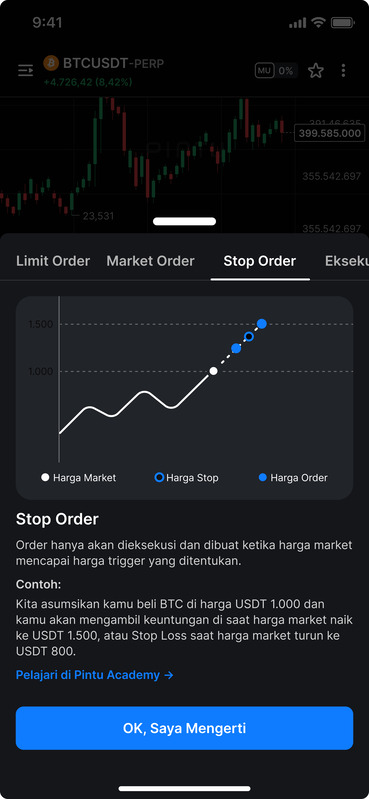
The main function of a stop order in crypto trading, such as on Pintu Futures, is risk management. This feature allows traders to:
- Automate Trading: No need to constantly watch the chart—orders are executed automatically based on your set parameters.
- Maintain Trading Discipline: Stop orders help avoid emotional decisions since scenarios are systematically anticipated.
How to Use Stop Orders on Pintu Futures
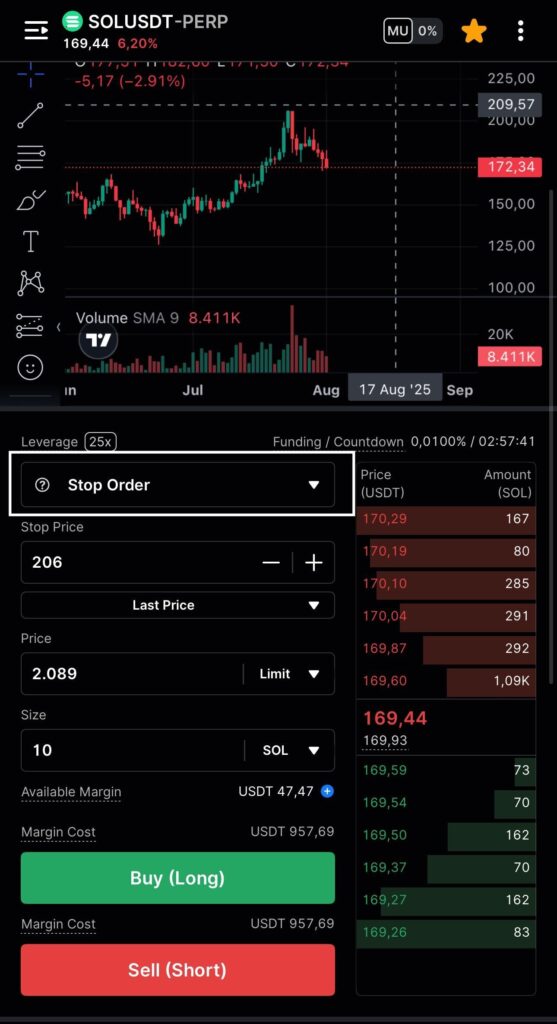
Here’s how to use the stop order feature on Pintu Futures:
- Open the Pintu app.
- Go to the Futures section.
- Select the cryptocurrency pair you want to trade (e.g., BTCUSDT-PERP).
- Choose the “Stop Order” type.
- Enter your desired Stop Price. You can also choose to refer to the Last Price or Mark Price.
Futures Tip: Choose mark price to match Futures parameters, since liquidation, losses, and profits are measured by mark price, not last price.
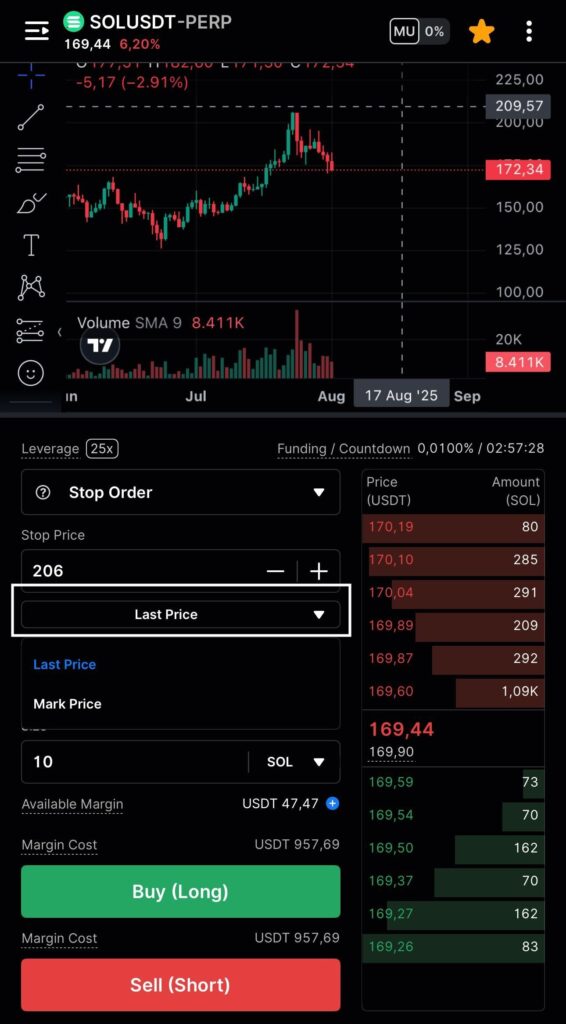
- Choose between Market or Limit. Enter your target price if you select Limit.
- Enter the position size you want to open.
- Select your position (Long or Short).
- Confirm your order.
Stop Order Example on Pintu Futures
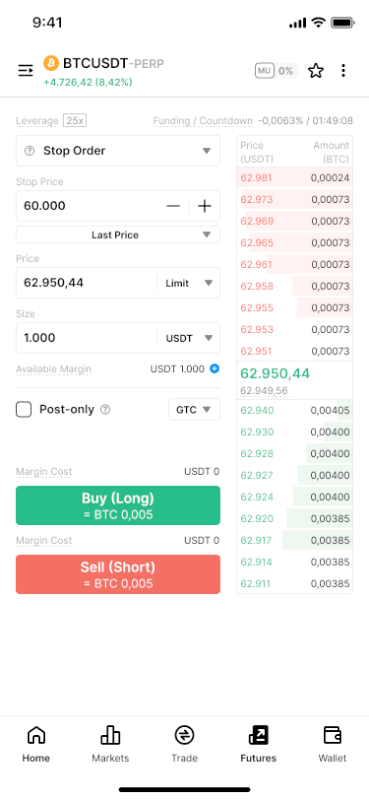
Suppose you’re trading BTCUSDT-PERP on Pintu Futures with up to 25x leverage. In this case, you want to use the Stop Order feature to buy (Long) Bitcoin if a certain price is reached.
In the example:
- Stop Price at 60,000 USDT This means your order will activate only if Bitcoin drops and touches 60,000 USDT.
- Price at 62,950.44 USDT (Limit) This is the limit order price you want to use once the stop price is triggered.
- Size of 1,000 USDT This is the order value you want to execute.
If Bitcoin’s market price falls to 60,000 USDT, the system will automatically place a limit order to buy Bitcoin at 62,950.44 USDT according to your settings. This feature helps you catch market momentum and protect your position from sudden price swings—without constantly monitoring the chart.
Just tap Buy (Long) to activate your stop order strategy!
When Should You Use a Stop Order?
Stop orders are highly recommended when:
- Trading in highly volatile markets like crypto futures.
- You want to automatically enter a position during breakouts or breakdowns.
- You’re new to trading and want disciplined risk control.
The stop order feature on Pintu Futures makes it easy to strategize and manage risk automatically. Don’t hesitate to try this feature to keep your crypto trading safer and more measured!
References:
- Investopedia. Stop Order. Accessed July 30, 2025.
- Pintu. Futures Trading. Accessed July 30, 2025.
Share