

How to stake crypto in Pintu Web3 Wallet
Jakarta, Pintu News – Staking is one of the popular ways to earn passive income from crypto assets. Through staking, you can lock assets on the blockchain network and get returns as rewards.
However, since each staking platform has different rules, it’s important to understand the general flow of staking and how to do it correctly, especially if you’re a beginner.
What Assets Can be Staked?
Staking is the process of locking up crypto assets to support the operation of a Proof-of-Stake (PoS) network or similar system. In return, you will receive rewards in the form of additional crypto.
However, not all assets can be staked. Only PoS-based cryptocurrencies or similar consensus derivatives generally support this feature-such as Ethereum (ETH), Solana (SOL) and Polygon (MATIC).
How to stake crypto in Pintu Web3 Wallet
Here are the practical steps for easy crypto staking.
1. Choose & Buy Crypto Assets that Support Staking
To be able to stake, you need to have an asset that supports staking, which is a PoS-based crypto such as ETH, SOL or MATIC. Buy these assets directly on trusted crypto exchanges or wallets, such as Pintu.
2. Activate and Set Up Your Crypto Wallet
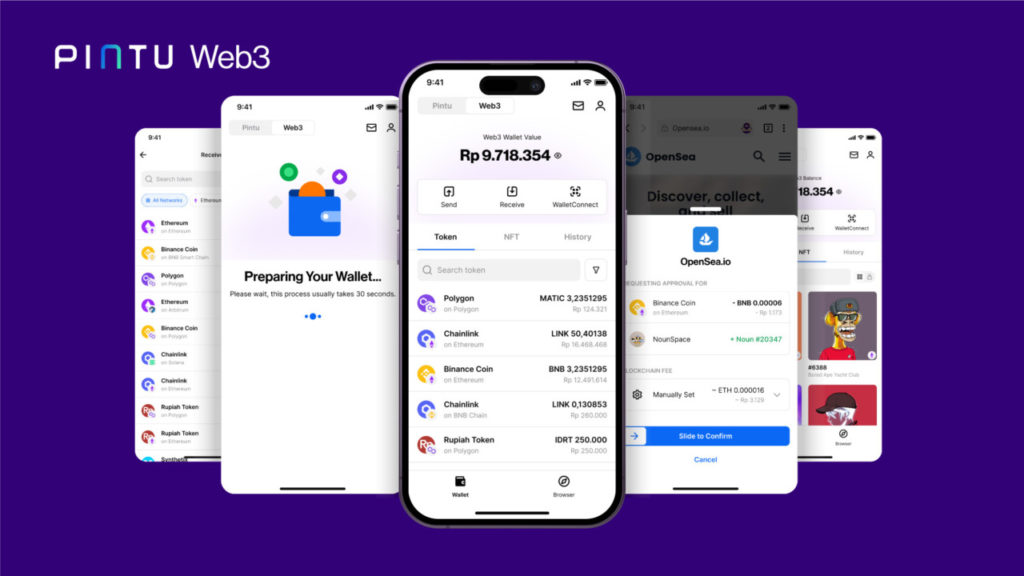
To do staking, you need to have a crypto wallet that supports Web3 features. One practical option is Pintu Web3 Wallet.
To use it, simply open the Pintu app and activate the Web3 Wallet feature directly from the main menu.
The Pintu Web3 Wallet is non-custodial and uses the MPC(multi-party computation) security system.
3. Choose Platform or dApp Staking
Use the built-in dApp browser in Web3 Wallet to access staking protocols such as Jito, Lido, EtherFi, EigenLayer, Rocket Pool, and many more.
Also Read: Pintu – Crypto App for Investing, Trading and Web3
Each protocol has a different lock-in, reward and fee system. Make sure you read the information carefully.
4. Perform staking according to protocol instructions
- Select a validator or staking pool.
- Enter the number of assets you want to stake
- Confirm the transaction in the wallet.
- Your assets are now “locked” in the network for a certain period.
5. Monitor Reward and Stake Status
- Rewards will be sent according to each protocol’s policy (daily, weekly, or by epoch).
- You can view your reward progress directly from Web3 Wallet or the dashboard of the protocol you are using.
Before staking, here are some things you should know:
- Lock Period: Some stakes lock the asset for a certain amount of time. Make sure you are prepared to hold the asset for that duration.
- Price Risk: The value of crypto assets can go up and down. The rewards you receive may decrease if the crypto price drops sharply.
- Fees & Charges: Some platforms charge fees from rewards or staking transactions.
By using Pintu Web3 Wallet, you can do crypto staking practically and securely in one app. Although the staking process varies depending on the platform and asset, the steps above can be a general guideline for beginners. Don’t forget to always do your research before choosing an asset and staking platform!
Latest News
© 2026 PT Pintu Kemana Saja. All Rights Reserved.
The trading of crypto assets is carried out by PT Pintu Kemana Saja, a licensed and regulated Digital Financial Asset Trader supervised by the Financial Services Authority (OJK), and a member of PT Central Finansial X (CFX) and PT Kliring Komoditi Indonesia (KKI). Crypto asset trading is a high-risk activity. PT Pintu Kemana Saja do not provide any investment and/or crypto asset product recommendations. Users are responsible for thoroughly understanding all aspects related to crypto asset trading (including associated risks) and the use of the application. All decisions related to crypto asset and/or crypto asset futures contract trading are made independently by the user.